Using Securely | Request Access | New Users | Current Users | Codex | FAQ | Restrictions for Use

ChatGPT Edu, powered by OpenAI, is available to WashU faculty and staff. WashU’s workspace provides secure, private access to OpenAI’s most powerful AI models in an environment designed for academic work.
Conversations are not used to train the model, making the workspace an appropriate environment for working with protected health information, student data, WashU, or personal intellectual property, or when developing research, writing, or code that that is intended to remain private.
Faculty, staff, and departments are able to request paid access through WashU IT.
Key Features:
- All-in-one expert for everyday tasks, including data analysis, coding, studying, deep research, and collaborative workspaces for shared projects
- HIPAA-protected and FERPA-compliant (except for Codex)
- Coding, data analysis, and visualization capabilities
- Context-aware image generation and interpretation
Using ChatGPT Edu Securely
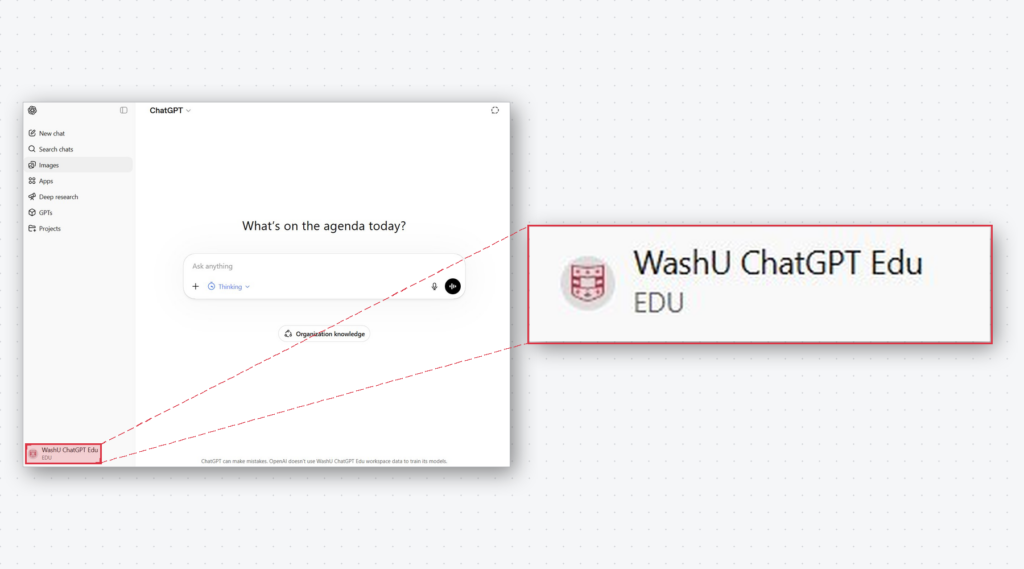
To verify that you are using WashU-Protected ChatGPT Edu, look for the “EDU” label at the lower left corner of your screen after signing in.
Requesting Access
WashU offers several ChatGPT Edu tiers to match different usage needs.
- Paid tiers are available to faculty, staff, and departments and are billed monthly based on the information provided during the request
- Each tier provides the same access to all ChatGPT Edu features and unlimited access to the default model for chatting
- Advanced usage is measured in credits — a unit OpenAI uses to meter usage of advanced features and models.
- More demanding capabilities (such as reasoning models, Deep Research, or image generation) consume more credits per use than standard chat
The following table summarizes the available tiers to help identify the best fit.
| Tier | Best For | Advanced Credits /Month | Cost |
|---|---|---|---|
| Basic | Infrequent users and basic chat | 52 credits | $10/user/month |
| Standard | Consistent users and infrequent researchers | 312 credits | $20/user/month |
| Premium | Power users, advanced reasoning, and frequent Deep Research | 1,062 credits | $50/user/month |
| Developers | Developers and researchers using Codex | 2,300 credits | $100/user/month |
Interested in requesting access?
Faculty, staff, and departments may submit a ChatGPT Edu subscription request here.
For New Users
Because many WashU community members currently have personal OpenAI accounts, the following section provides instructions for accepting WashU’s invitation & securely accessing OpenAI with a WashU Key.
Note: If an OpenAI account is already registered with a WashU email address, proceeding with these steps will require migrate the account into the WashU-managed workspace. Please review this important information before migrating the account.
- Receive Welcome Email
-
Soon after the ServiceNow request form is approved, individuals will receive an email welcoming them to WashU’s ChatGPT Edu. This email will introduce the platform and provide a link to access and accept the Appropriate Use Agreement.
- Access and Accept Appropriate Use Agreement
-
Before being granted access to WashU’s ChatGPT Edu workspace, individuals will be required to review and acknowledge expectations for safe and responsible use of ChatGPT Edu. The welcome email includes a link to the Appropriate Use Agreement.
- Access ChatGPT
-
After accepting the agreement, the account will be automatically created. This process typically takes 1-2 hours. Individuals will know it’s ready when they receive an email from OpenAI inviting them to the WashU ChatGPT Edu workspace.
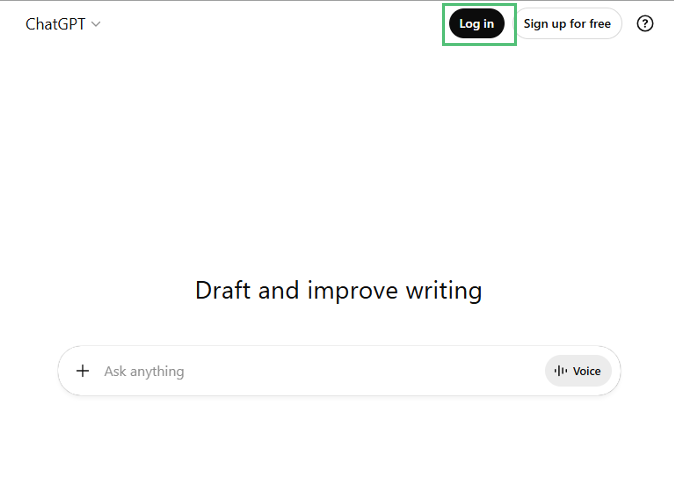
Once receiving the email from OpenAI, individuals can either use the link in the email or go directly to chatgpt.com and click the login button.
- Add the WashU Email
-
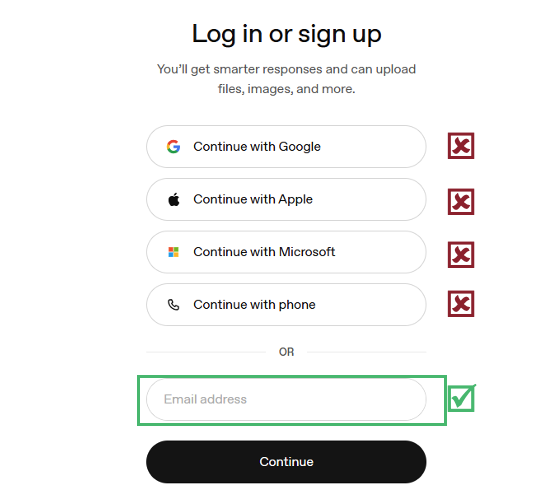
Enter your WashU email and click ‘Continue’.
- Confirm to use WashU Key for Login
-
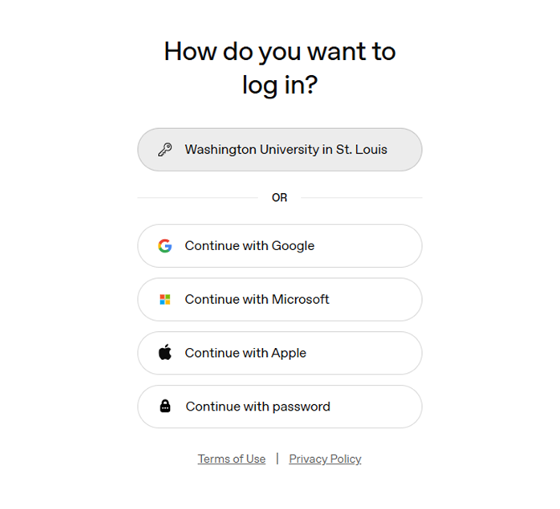
Click the ‘Washington University in St. Louis’ button.
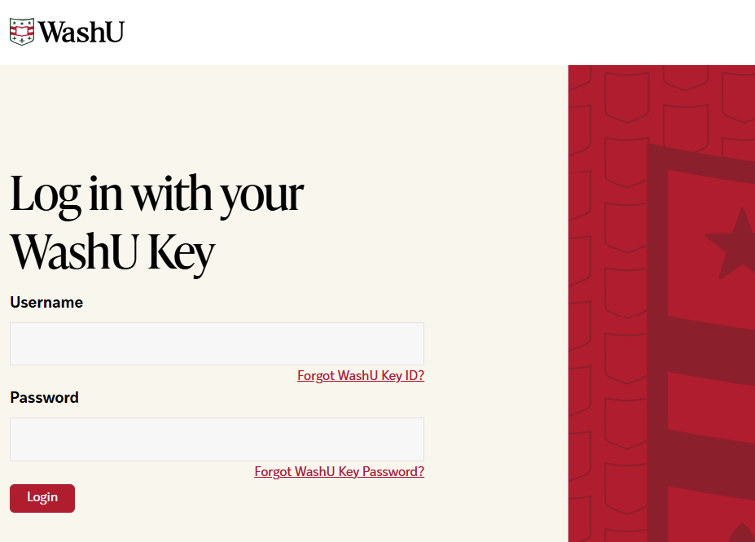
- Log in with WashU Key
-
Enter your WashU Key details.
Please note that the WashU Key login is bypassed if you already have a valid WashU Key session.
- Use ChatGPT Securely
-
You are now logged into ChatGPT Edu using your WashU account and can securely interact with its features.
Resources for Current Users
- OpenAI-Provided Support
- WashU IT Support
Codex
As part of WashU’s subscription to ChatGPT Edu, users can have access to Codex, OpenAI’s coding agent that helps build and ship with AI. Unlike other OpenAI tools, Codex is not approved for use with data protected by HIPAA or FERPA. Additionally, Codex use is not applicable to all licensed OpenAI users. Licensed users can request access to Codex.
Because of the increased responsibilities and liabilities with Codex, individuals will be required to review and complete a responsible use addendum before being granted access to this advanced tool.
Interested in adding Codex to the ChatGPT Edu subscription?
FAQ
- Is this workspace approved for use with HIPAA & FERPA data?
-
Yes. WashU has executed a Business Associate Agreement (BAA) with OpenAI, making this workspace appropriate for use with HIPAA & FERPA data.
Note: Codex is not covered by the BAA, so use of Codex is not approved for use with data protected by HIPAA or FERPA.
Learn important information about using AI with PHI at WashU.
- Does WashU monitor my chats?
-
In the normal course of operation, WashU does not monitor or read your individual chat histories. However, specific legal or administrative circumstances, such as a litigation hold or an investigation, may require access to data.
- Does ChatGPT Edu support text, images, and code in one session?
-
Yes. ChatGPT Edu supports multimodal input, including text, images, files, and code, and can work across these formats seamlessly within a single conversation.
- Can I upload multiple files to ChatGPT Edu?
-
Yes. You can upload multiple supported file types and reference them together.
- How can I export my ChatGPT conversation data?
-
ChatGPT Edu users are currently unable to use ChatGPT’s standard export feature. This is a vendor restriction affecting managed workspaces with a BAA and data residency agreements. We are working directly with OpenAI to enable an appropriate self-service export option. The following temporary workaround can be used until a permanent solution is available.
Temporary workaround: save individual conversations
Save a conversation as a PDF- Open the conversation in ChatGPT.
- Scroll through the entire conversation to ensure all content is loaded.
- Open the browser’s print window:
- Windows: Ctrl + P
- macOS: Command + P
- Select Save as PDF or Microsoft Print to PDF.
- Review the preview to confirm the complete conversation is included.
- Save the PDF.
Save a conversation as editable text
- Open the conversation and scroll through all its messages.
- Select and copy the conversation text.
- Paste it into an another application, such as Microsoft Word.
- Review the document carefully, as tables, code, images, and formatting may not copy perfectly.
- Save the document.
Save files separately
Uploaded or ChatGPT-generated files may not be included completely in a PDF or copied transcript. Download any required files individually and store them with the saved conversation.
This export option is the one that OpenAI currently supports, we’re working closely with them to resolve this as other customers are having the same issue. OpenAI has expressed their desire to address this issue as soon as possible.
- What features are not available within ChatGPT Edu?
-
Almost all features available in the consumer version of ChatGPT are available in ChatGPT Edu.
The following features are not available: Canvas, Agent Mode, Record, and Code on macOS
- Can ChatGPT Edu access current web information?
-
Yes, with limitations. Web access is controlled and filtered to support safe, compliant use in a HIPAA-protected environment. This means responses are grounded in your prompts and curated web results, not arbitrary live browsing.
- How does OpenAI protect our conversations?
-
All conversations are encrypted in transit using TLS 1.2 or later and at rest using AES-256. This BAA-protected workspace is separate from standard ChatGPT plans, which do not carry HIPAA coverage.
- Is my data used to train OpenAI models?
-
No. Data in this workspace is never used to train OpenAI models.
- Can I use the ChatGPT mobile app securely?
-
Yes, using the ChatGPT mobile app on iOS and Android is secure, provided you access it using your WashU login. Click your ChatGPT app’s profile and log in with your @wustl.edu email address to ensure you are accessing the BAA-protected workspace, not a personal account.
- Can I use the ChatGPT Edu securely in a browser?
-
Yes. You must access ChatGPT Edu through chatgpt.com and confirm you are signed in with your WashU Key. Do not use ChatGPT through personal accounts, browser extensions, or third-party integrations. Those sessions are outside the HIPAA-protected workspace and must not be used with any sensitive or protected data. See the “Using ChatGPT Securely” section at the top of this page for detailed instructions.
- Will my data be private?
-
Your prompts and conversations are never used to train the OpenAI models. The ChatGPT Edu environment is fully HIPAA- and FERPA-compliant.
- How long does ChatGPT Edu retain chat history?
-
ChatGPT Edu retains chat history for 18 months.
- When would I lose access to ChatGPT Edu?
-
Access is revoked upon graduation, end of employment, or at the conclusion of WashU’s contract with OpenAI Edu. Once access is revoked or the workspace is deactivated, content follows a 30-day deletion schedule. Deleted chats are not recoverable.
- How do I get paid access?
-
Faculty, staff, and departments can request a paid tier through the WashU IT ServiceNow portal. Departments will be billed monthly based on the details provided during the request.
- What are advanced credits, and how are they used?
-
Credits are OpenAI’s unit for metering usage of advanced features and models. Standard conversation uses fewer credits, while more demanding capabilities — such as reasoning models, Deep Research, or image generation — consume more. Each paid tier includes a monthly credit allotment. See OpenAI’s Rate Card for a full breakdown.
- What happens if I run out of credits?
-
Contact the IT Service Desk for guidance on adjusting your tier.
Restrictions for Use
ChatGPT Edu is limited to university-related activities, such as academic teaching or research. The use of WashU’s ChatGPT instance for personal activities is prohibited.
Be sure to follow all legal, regulatory, and University policies when collecting or storing sensitive data. If unsure whether or not your tasks or documents contain sensitive data, contact the departments below for guidance.
- HIPAA Privacy Office for Protected Health Information (HIPAA)
- University Registrar for Protected Student Information (FERPA)
- Information Security, including Personally Identifiable Information (PII)
- Human Research Protection Office for the use in human research studies