Using Gemini Notebook Securely | For New Users | Resources for Current Users | FAQ | Restrictions for Use
NotebookLM is now Gemini Notebook
As of July 16, 2026, Google has renamed NotebookLM to Gemini Notebook. The name and logo have changed, but the tool, existing notebooks, and shared links remain the same. The updated branding will roll out across the web and mobile apps over the coming weeks.
Gemini Notebook is now available to the WashU community. Part of Google Workspace, it provides access to Google’s AI-powered research and thinking partner, grounded in the sources you provide. Gemini Notebook lets you upload PDFs, web pages, Google Docs/Slides, YouTube links, audio files, and more, and then get summaries, citations, study guides, mind maps, audio overviews, and even video overviews, all with enterprise-grade protections when used with a WashU account.
Gemini Notebook is available to WashU Danforth Campus users.
Gemini Notebook is not approved for use with data protected by HIPAA or FERPA. WashU Medicine faculty, staff, and students may request access by submitting a WashU Medicine AI Exception Request. If approved, access to Gemini Notebook will be granted.
Please see Restrictions for Use for additional details.
Key Features:
- Import documents, PDFs, and text files into a single workspace
- Automatically create summaries, outlines, and key points
- Ask context-specific questions across all uploaded materials
- Build and maintain living notebooks that update as you add new content
Using Gemini Notebook Securely
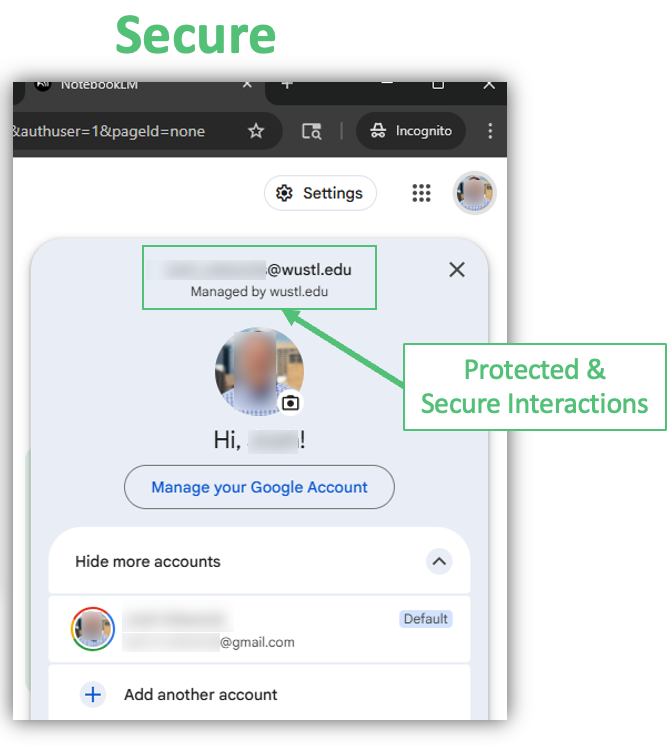
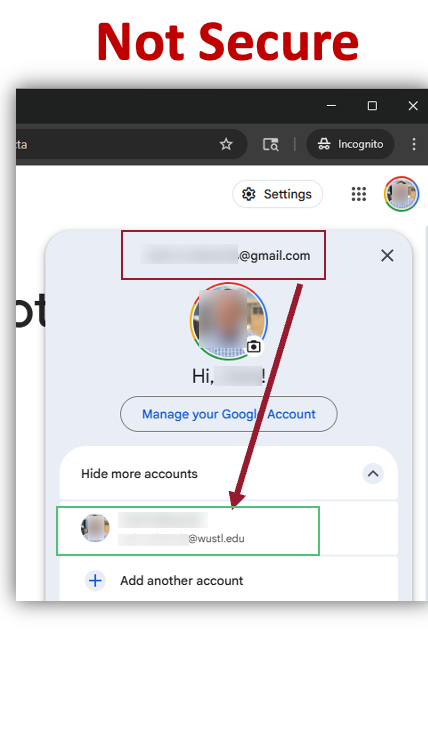
To verify that you are using WashU-Protected Gemini Notebook, look for the “Managed by wustl.edu” label above to your Google Profile picture. If you do not see “Managed by wustl.edu”, click your profile picture and select your “@wustl.edu” Google profile.
Gemini Notebook
Gemini Notebook is Google’s AI‑powered research and thinking partner, grounded in the sources you provide. Upload PDFs, web pages, Google Docs/Slides, YouTube links, audio files, and more.
For New Users
Because many WashU community members currently have personal Google accounts, the following section provides instructions on accessing Google Services using your WashU account. Please follow these instructions to securely access Google’s Gemini Notebook.
- Access Google Gemini Notebook Account Selector
-
Select Log in to Gemini Notebook to access the Google Account selector and use your WashU account.
- Select your WashU Google Account
-
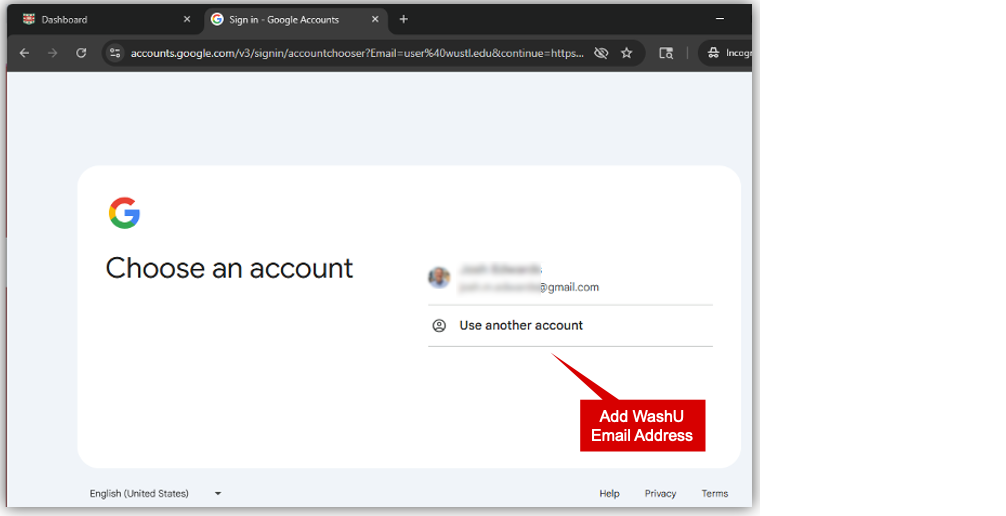
If you do not see your @wustl.edu in your list of Google profiles, select Use another account.
- Add your WashU Google Account
-
Enter your @wustl.edu email address in the email or phone box and press enter or select the Next button.
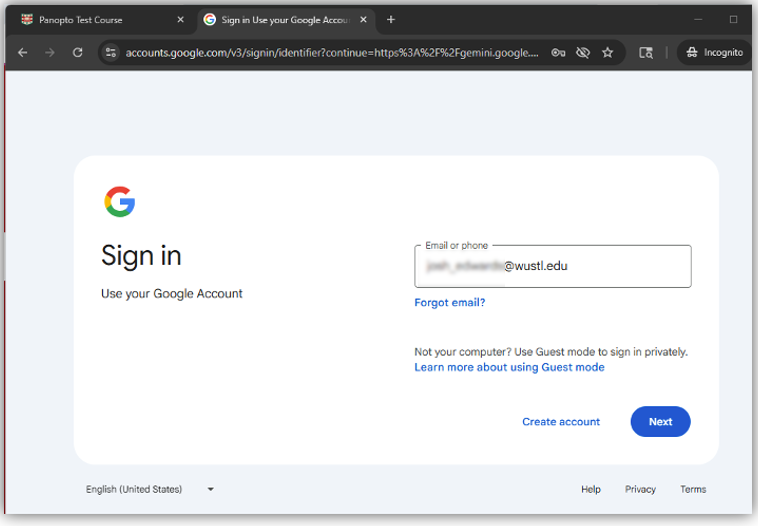
- Use Gemini Notebook Securely
-
You are now logged into Gemini Notebook using your WashU account and can securely interact with its features by creating your first notebook.
Resources for Current Users
- Self Service On-Demand Training
- WashU IT Support
Google AI Pro
WashU’s license for Gemini & Gemini Notebook provide generous quotas and usage limits that meet the needs for the majority of campus. For those advanced users who may be experiencing usage limits, WashU IT provides the option of paying for a Google AI Pro license. The most common reasons to need Google AI Pro are:
Gemini
- Increased context window
- Larger file uploads
- Increased usage quotas
- Video generation
- Deeper Google Workspace integration
Gemini Notebook
- Increased notebooks
- Increased sources
- Increased usage quotas for chats, overviews, quizzes, etc.
Interested in Google AI Pro?
FAQ
- Is Gemini Notebook approved for HIPAA and FERPA data?
-
Gemini Notebook is not approved for use with PHI. It is approved for use with FERPA-protected data.
Learn important information about using AI with PHI at WashU.
- Is Gemini Notebook integrated with Canvas?
-
Yes, the Gemini LTI is enabled in WashU’s MyCanvas! Please see Learn about Gemini LTI™ for additional details.
- Can I Ask questions across multiple documents?
-
Yes. You can search and query all uploaded documents together.
- Can Gemini Notebook access websites?
-
Yes, you can link to publicly accessible websites.
- How many sources can a notebook include?
-
Please see Gemini Notebook Quotas & Usage Limits for the current limits.
- Is my data used to train Google AI models?
-
No. Data in Google Gemini Notebook is not used for training.
- What file types can I upload to Gemini Notebook?
-
Gemini Notebook supports the most common file, image & media sources including docx, pdf, mp3, avif, etc.
- Where can I learn about advanced Gemini Notebook features?
-
Please visit Gemini Notebook Help
- Does WashU monitor my Gemini Notebook interactions and data?
-
In the normal course of operation, WashU does not monitor or read your individual chat histories. However, specific legal or administrative circumstances, such as a litigation hold or an investigation, may require access to data.
Restrictions for Use
Using Gemini Notebook with your WashU account is limited to University related activities, such as academic teaching or research. The use of Gemini Notebook with your WashU account for personal activities is prohibited.
This application is not HIPAA compliant. Be sure to follow all legal, regulatory, and University policies when collecting or storing sensitive data. If unsure whether or not your tasks or documents contain sensitive data, contact the departments below for guidance.
- HIPAA Privacy Office for Protected Health Information (HIPAA)
- University Registrar for Protected Student Information (FERPA)
- Information Security, including Personally Identifiable Information (PII)
- Human Research Protection Office for the use of ClickUp in human research studies