The WashU IT work environment operating model has the following categories:
- Onsite – Always on campus
- Hybrid – Employee has a regular or varied schedule of some days on campus and some days working remotely
- Remote – Employee rarely if ever works from campus
Each department implements this operating model to fit the needs of their team and customers as appropriate. Managers will provide specifics around how each department will operate.
4480 Clayton Hub Details
Each WashU IT team or department is assigned a dedicated block of desks. Specific team members who work onsite have designated desks, while shared cubicles are available and can be reserved by IT teams as needed.
- The IT Space Planning Hub Documentation box folder is continually updated with 4480 Clayton Space Changes and Building updates.
- Please see the 4480 Clayton Floor Plan, which includes the shared hotel space schedule and additional space details.
- Documentation on shared space guidance and best practices will be provided on-site for WashU IT Team Members.
- Conference rooms and shared cubicles can be booked in Outlook Calendar. Please refer to the quick reference guide, Reserving Shared Hotel Space at 4480 Clayton through Outlook Calendar, for step-by-step instructions on how to reserve shared space.
- A microlearning video (3min) with step-by-step instructions on how to reserve shared space is also available in Workday Learning.
When Going to the Office
WashU IT workspaces have been equipped to provide positive and safe work environments for our students, faculty, staff, and contractors.
Please use the list below to view more information about working on campus.
In our efforts to continue supporting teams as we come to the office more often, the IT Admin team will have both Administrative Coordinators on each site on a rotating schedule.
WashU IT Administrative Coordinators are available Tuesdays and Wednesdays in the WashU IT Hub (4480 Clayton) to answer your building and facility questions or issues, if you need office supplies, or need general administrative assistance.
Just stop by cubicles 1400A and 1400D.
IT Admin will make supply orders for break rooms and copy rooms on a monthly basis to keep our coffee and supply inventory stocked. If you notice that we are running low, or are out of, a supply please contact the WashU IT Admin team.
In order to best support the IT Admin team’s efforts please refrain from removing any delivered supplies or boxes from their area. All supplies must be inventoried upon receipt then they are distributed to the copy and break rooms for general use.
All WashU Students, Faculty, and Staff are eligible for a free Metro Pass, giving you unlimited MetroLink and MetroBus fare for one (1) year. Please see the Metro U-Pass page for more information.
All of the WashU IT work locations can be easily accessed via MetroLink.
Please follow the below protocols, ensuring mutual respect and consideration.
- Be considerate when using shared spaces and clean up for the next person.
- Wipe down docking station and desktop with sanitizing wipes.
- Guide for sanitizing technology equipment
- Dispose of food waste in central trash receptacles.
- Wipe down docking station and desktop with sanitizing wipes.
- Break room amenities may be used.
- Be conscious of your personal items in shared workspaces as most employees will not have keys to lock the desks. Take personal items with you when leaving for the day.
- Phones have been removed from most shared spaces.
- Softphone instructions can be found in the Call Forwarding section of the Telecommunications webpage.
- Use headsets for calls and meetings when around others.
Please do not take equipment or furniture from the office home without first discussing it with your manager and documenting within the Remote Work Agreement form (Docusign form).
Kitchens are available at all WashU IT work locations with resources such as refrigerators, sinks, microwaves, toaster ovens, and free coffee.
Please Note:
- Not all locations have the same set of resources
- Remember to bring your own coffee cup as not all locations provide them.
There are also a plethora of dining options near each work location.
- WUSM Dining Services has useful information for WUSM on-campus dining options, including the Food Truck Row schedule.
- North Campus occupants have all of the dining options available in the University City Loop
- West Campus has multiple dining options available near in Clayton
- Danforth Campus Dining Services has useful information for on-campus dining options.
Did you know that the WashU IT Hub (4480 Clayton) has lockers and showers on site?
For individuals who would prefer to bike or run to work, run at lunch, or just get their steps in on a hot day the WashU IT Hub (4480 Clayton) has lockers and showers available for staff to use.
The locker bay on the second floor by the east breakroom of the 4480 building is now open to anyone who would like a secure space to keep personal items during their shift.
A few items to note:
- Lockers are first come, first served.
- Please bring your own showering supplies and be considerate of others.
- Any employee wishing to use a locker for their shift must bring their own lock (the lockers were originally set up with electronic locks, however, they are no longer fully functional).
- If you have reserved a locker and forget your combination or lose the key to your lock, you can call facilities or campus security for assistance with cutting the lock off.
- WUSM Facilities / Protective Services
- 314-362-3100
Please contact WashU IT Administration with any questions.
Parking is available for purchase on both the Danforth (includes North and West Campuses) and the School of Medicine campus (WUSM).
WUSM Campus
- Parking for the WashU Hub (4480 Clayton) is available at the Clayton Garage at a discounted rate. This garage is located directly across the street from the building.
- The Clayton Garage is located across the Clayton Ave from the building
- You must visit the garage staff to purchase a prepaid card in order to receive the discounted rate
- There is limited surface parking at the 825 lot south of Clayton Avenue
- Please visit the Operations and Facilities Management Parking page for more information.
Danforth Campus
- Danforth Campus includes North and West Campuses
- Parking passes can be purchased from Danforth Parking and Transportation
- Pass Option include:
- Annual Parking Pass
- Occasional Parking Pass (OPP)
- Please see Danforth Parking and Transportation for more information
- Daily parking can be purchased using the Passport Parking app
The WashU IT Hub (4480 Clayton) utilizes PaperCut to facilitate staff printing needs.
WashU IT managed computers are already set-up to print to PaperCut enabled print release stations. WashU IT managed Mac’s may need to use Self Service to install the needed print drivers, covered in the PaperCut Knowledge Article.
Personal computers and mobile devices can also print to PaperCut. Instructions are available on the Printing How To page.
Reserving Conference Rooms
There are conference rooms, huddle spaces, and media tables available to facilitate whatever meeting needs you may have.
All three types of meeting spaces are reserved using Outlook
- Open the Outlook meeting invitation for which you need a space
- Enter WashU IT 4480 in the Location field
- The address book will return available options in the building
Work Policies
Work Location Agreement
All WashU IT team members, regardless of their work arrangement (Onsite, Hybrid, or Remote), must complete the Work Location Agreement form (Docusign form). Even if you have completed a previous agreement, you need to complete the latest version, released November 7, 2023. Please contact your supervisor for instructions.
Work Location Agreement (Docusign form)
Expense Reimbursement
In regards to travel and non-travel expenses when working remotely, WashU IT limited what would be reimbursed and defers to manager approval rather than itemizing in agreements.
Guidelines for Business Expenses Associated with Remote Work (PDF)
ADA Accommodations
ADA accommodations for remote workers will be handled on a case by case basis by HR following the existing Accommodation Process. ADA accommodation items must be returned upon terminating from WashU, unless department wishes to allow employee to purchase the equipment provided under their accommodation.
Additional Policies:
Microsoft Teams Tip
As a way of letting co-workers know your location, set your Microsoft Teams status message to reflect where you are working for the day. To do this, select your profile icon on the top right and select “Set status message”.
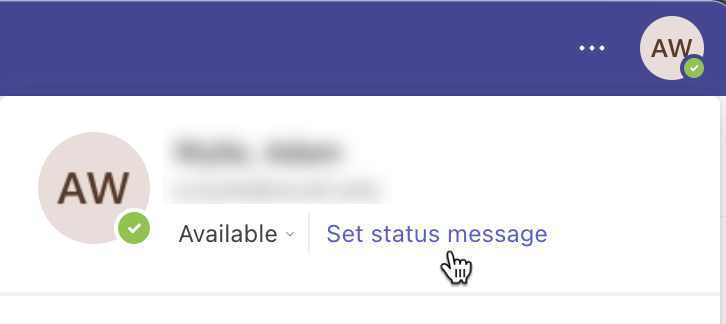
Status Examples
- Medical Campus
- 4480
- MCC
- West Campus
Remote
North Campus
Danforth